Feb 28, 2017

Getting Started in Android Development: Part 2: Publishing the First App

Here I simply describe what it takes to publish an Android application that I described in the previous part, Building the First App.

Thanks to SUSE, my employer, for sponsoring a company-wide Hack Week which this project was a part of!

I will only deal with free apps: no cost for the user and no advertisements. I guess it would be easy to slap an advertisement module on it or put a minimal price tag on the app. But then it would be morally wrong for me to keep the profits without giving SUSE a cut, and the organizational and accounting process would quickly turn this into a lawyer's Hack Week. Scratch that.

Registering a Publisher Account: $25

I started with the instructions at Get Started with Publishing.

I could have reused my existing Google account but decided to create a new one. The next step may put you off: a 25 USD registration fee is needed.

Then a fair amount of legalese, which I did skim through, and I was rewarded by the knowledge that Google apparently does not like developers to publish web browsers or search engines.

Publishing the App

When I thought my application was good enough to be published I went to the Developer Console to make a Store Listing.

Entered the app name, summary, long description; no surprise there, I had expected that from openSUSE RPM packaging. Then came the innovation: screenshots are required! In fact,

  • Two screenshots
  • a high-resolution icon (512x512 pixels)
  • a feature graphic (1024x500 px) which appears as the heading of the app listing page

Reportedly the new standard way to take a screenshot is Power + Volume Down. But that did not work for my Xperia phone. I had to enable the following setting, after which a Screenshot option appeared in the menu that appears after holding Power.

  • Settings, then
  • Device / Buttons, then
  • Power button / Power menu, there
  • enable Screenshot ☑.

For a moment I feared I would need to hire a designer for the icon, but then I told LibreOffice to write a 6 in a 360pt big font and used that. whew!

More form items to fill: App type: Applications (not Games); Category: Entertainment (I guess); Pricing and distribution: Free, All countries, No ads.

We do not process any user data so we check a box that we're Not submitting a privacy policy.

Now we are at a point in the form where it says that we need to submit a content rating, but it won't let us do it. I think it only allows to rate after the app has been uploaded.

Are we ready to upload the app code? Upload APK... bzzzt, wrong! must not upload a debug build. Did not find a way to make a production build in the GUI so used the CLI for a change: ./gradlew assemble... bzzzt, wrong! must not upload an unsigned build.

Signing software makes sense. Except the signing mechanism is unfamiliar to me, something involving a Java KeyStore. So I followed the manual: Sign Your App. Ended up with a file in my home directory and needing to enter two passwords each time I build a signed APK. At least no certification authority needed to be involved.

Content Rating: Category: Utility, No violence, No sexuality, No offensive language, No controlled substances (illegal drugs), No communication with other users, No sharing of personal information, No sharing of location, No digital goods purchasing, No Nazi symbolism, Not a browser or search engine.

Finally all information was there, I hit Publish, and I wondered how long the review process would take. It took about 3 hours on a European Tuesday noon.

You can try out Just Roll One Die on Google Play. The source code for Just Roll One Die is on GitHub under a MIT license.

Next

In the next part we will deal with software bloat. Because an app that can roll a 6 is justified in taking up 6MB on your kid's tablet, right? Right??

Feb 27, 2017

Getting Started in Android Development: Part 1: Building the First App

Getting Started in Android Development: Part 1: Building the First App

Do you know programming and want to start with the Android platform? Just like me! Read on.

Thanks to SUSE, my employer, for sponsoring a company-wide Hack Week which this project was a part of!

In case you wonder why Android: it is a good balance of work and play. Android is not the coolest toy to play with at the moment, but it is the most versatile device that people are likely to have at hand, especially when traveling. And Android already outnumbers openSUSE and all other OSs in my household.

This is a three part series: 1) building an app, 2) publishing it on Google Play, 3) trimming it down. In this part, we'll set up the development environment, follow the official tutorial to build a trivial app, then build a trivial yet useful app of our own.

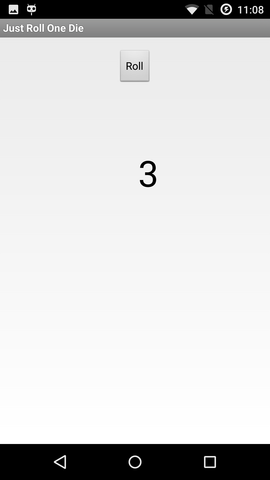
a screenshot of my first app

a screenshot of my first app

Installing the SDK

I am using openSUSE Leap 42.1 (x86_64). You will notice that I keep tallying the disk space taken. This is because I am a bit short of space on one of my machines, and need to have an idea how much cleanup is needed.

Went to https://developer.android.com/.

Downloaded Android Studio (2.2.3 for Linux, 438 MiB, unpacks to 785 MiB), followed the instructions, unpacking to /opt (getting /opt/android-studio).

Ran /opt/android-studio/bin/studio.sh. Was greeted by an "Android Studio Setup Wizard": chose a Standard setup. Additional download of 890MB (1412MB unpacked) to ~/Android/Sdk.

Got a slightly confusing notice about KVM emulator acceleration. It seems that if you have used KVM before on your machine, the SDK will use it out of the box. But even with acceleration, don't expect the emulator to be fast. If you have a real device, use that.

"Building Your First App"

For the most part I simply followed the tutorial for building, installing, and running a trivial app that asks for a message and then displays it. The documentation feels excellent!

The one non-obvious part was choosing which Android version, in other words, which API level, to target. in the Target Android Devices dialog, the preselected option is API 15: Android 4.0.3 (IceCreamSandwich). That is presumably based on the current active device statistics which result in the app being compatible with 97% of devices. The oldest one is API 9: Android 2.3 (Gingerbread), which was a bit disappointing since my older phone from 2010 runs API 8, 2.2 (Froyo). (Don't worry, I eventually solved that in part 3.) Fortunately my newer phone has API 22: Android 5.1.1. Installed the API 22 platform too, to match the phone, about 100MB.

Connected my phone with a USB cable, pressed Run, and there it was! Don't worry, a buggy app will just crash and not affect the rest of your phone.

Just Roll One Die

Now it looked like I knew enough to make a useful app, so I did: Once my family was on a train with a board game table but we had no dice. So my first actual app is Just Roll One Die. A totally simple application that can just roll one ordinary six-faced die. Six faces ought to be enough for anybody. No pictures, just digits.

The source code for Just Roll One Die is on GitHub under a MIT license. You can try out Just Roll One Die on Google Play. (The details of how to get an app there are described in Part 2: Publishing the First App.)

How about you?

I was amazed how easy it was and I can't believe that it took me so long to try this. Wy don't you too give it a try and let me know how you are doing.

Feb 16, 2017

Text to Speech with eSpeak and Epos

A humanoid robot should be able to talk. So I looked around for some open source speech synthesis software.

(The above video does feature a talking robot (and a multilingual dolphin) but that's where similarities with the following content end.)

eSpeak

Hello world:

espeak 'Hello, world!'

Standard input works too:

espeak <<EOS
A robot may not injure a human being or, through inaction,
allow a human being to come to harm.
EOS

I need the robot to speak Czech too:

espeak -v cs 'Dobrý den!'

Chinese also seems to work, at least to my beginner ear:

espeak -v zh '认识你很高兴'
# The same in pinyin
espeak -v zh 'ren4shi ni3 hen3 gao1xing4'

To put the words to the robot's mouth we first need to save the sound to a file:

espeak -w dobry-den.wav -v cs 'Dobrý den!'    # 16 bit, mono 22050 Hz

Now a thing that is not so useful for the robot, but a cool diversion. This tells eSpeak to be quiet, and transcribe the text in International Phonetic Alphabet.

espeak -q --ipa 'All human beings are born free and equal
  in dignity and rights. They are endowed with reason and conscience
  and should act towards one another in a spirit of brotherhood.'

ˈɔːl hjˈuːmən bˈiːɪŋz ɑː bˈɔːn fɹˈiː and ˈiːkwəl ɪn dˈɪɡnɪti and ɹˈaɪts

ðeɪ ɑːɹ ɛndˈaʊd wɪð ɹˈiːzən and kˈɒnʃəns and ʃˌʊd ˈakt tʊwˈɔːdz wˈɒn ɐnˈʌðəɹ ɪn ɐ spˈɪɹɪt ɒv bɹˈʌðəhˌʊd

And it also works for Czech:

espeak -q -v cs --ipa 'Všichni lidé rodí se svobodní a sobě rovní
  co do důstojnosti a práv. Jsou nadáni rozumem a svědomím
  a mají spolu jednat v duchu bratrství.'

fʃˈixɲi lˈideː rˈoɟiː se svˈobodɲiː a sˈobje rˈovɲiː tsˈo do dˈuːstojnˌosci a prˈaːv

jsoʊ nˈadaːɲi rˈozumem a svjˈedomiːm a mˌajiː spˈolu jˈednat v dˈuxu brˈatr̩stviː

epos

The problem with eSpeak is that it sounds quite robotic. I remembered that for Czech, the epos system was much better, also for its availability of better quality downloadable voices.

I installed epos (here as an openSUSE RPM) and downloaded the high quality voices epos-tdp.tgz, then unpacked them to the right place:

cd /usr/share/epos/inv
sudo tar xvf .../epos-tdp.tgz

At first I got no sound but strace showed me a problem with /dev/dsp and a bit of searching turned out that I must run eposd with a dsp wrapper:

padsp eposd $OPTIONS
# eg.
padsp eposd --voice machac
padsp eposd --voice violka

Another quirk is that epos wants the input in ISO Latin 2, so I used iconv:

while read S; do say-epos $(echo "$S" | iconv -f utf8 -t l2); done

For saving the sound to a file, use -w to use a fixed file name ./said.wav, or -o to use stdout:

say-epos -w Ahoj
say-epos -o Ahoj > ahoj.wav

Other systems?

The thing that reminded me of epos was this summary written by a small Czech phone operator.

Have you tried text-to-speech software? Which one sounds the best?

Feb 7, 2017

Jenkins as Code

I saw a couple of talks last week, and learned about several ways of automating Jenkins CI.

The problem being solved is: if you automate your builds and tests, why still click the Jenkins web UI by hand? Script it instead.

Jenkins Job DSL, which is based on Groovy (a JVM language). Another topic was Jenkins Pipeline which helps managing many jobs that depend on each other.

In Test Driven Infrastructure, Yury Tsarev presents, among many other things, Jenkins Job Builder. JJB takes descriptions written in YAML or JSON and translates them to Jenkins API with Python.

Jan 30, 2017

Capturing and Decoding Lego Mindstorms EV3 Bluetooth Communication

The Lego Mindstorms EV3 robots can be controlled with an Android app (Lego Mindstorms Commander) communicating with the brick via Bluetooth. The command protocol is documented by Lego in the EV3 Communication Developer Kit and the commands themselves in the EV3 Firmware Developer Kit (get them from Mindstorms Downloads).

I wondered what exactly goes on and I decided to capture the communication and decode it, to learn both about Bluetooth and about the details of the EV3 protocol.

Good Robot. Good Robot!!

I succeeded and made a couple of useful tools along the way:

See also the previous post about sending data (EV3 commands) over USB.

Outline

  1. Enable Android Bluetooth logging
  2. Run the Commander app and exercise the robot a bit
  3. Transfer the log to a PC
  4. Extract the serial data (RFCOMM) from the Bluetooth dump
  5. Decode the EV3 protocol
  6. Disassemble the EV3 instructions

1. Enable Android Bluetooth Logging

  • Open Settings
  • In the System section, choose Developers (this needs to be enabled first by tapping Build number 7 times)
  • Enable Bluetooth HCI Log

2. Run the Commander app and exercise the robot a bit

3. Transfer the log to a PC

On the phone/tablet:

  • Open Settings
  • System > Developers
  • Disable Bluetooth HCI Log

Connect to the PC with a USB cable.

My older Android phone offered to mount its storage as a USB disk drive, but the newer one no longer has that option, offering MTP instead. I transfered the log file with a KDE tool:

$ kioclient cp 'mtp:/Xperia Z3/Interní úložiště/btsnoop_hci.log' .

4. Extract the serial data (RFCOMM) from the Bluetooth dump

The tool I made for this is btsnoop-decode.rb.

I learned the bare minimum needed about Bluetooth so it is very likely the tool only works for this specific use case.

Originally I opened the btsnoop log with Wireshark and guessed my way through the BT protocol layers. In the end the RFCOMM length field was harder than usual to guess and half of my packets were wrong. So I resorted to finding the appropriate part of the Linux kernel source to find out the format.

5+6. Decode the EV3 protocol and dissassemble the EV3 instructions

The people of the ev3dev project have already produced a disassembler which we will use in the next step. But that one assumes you start with a program file (RBF).

Here we have a log containing not only the usual RBF instructions but also System Commands.

I made an ugly hack of the lmsdisasm tool and arrived at a version that disassembles the log produced by the RFCOMM extractor.

Play time

The above experiments enabled me to put together a little script that can control the robot from a Linux terminal, having it ride around and even speak a custom sound file: lethargic-ministers/lms.py.

Jan 2, 2017

USB Communication with Python and PyUSB

Say we have a robot with a USB connection and command documentation. The only thing missing is knowing how to send a command over USB. Let's learn the basic concepts needed for that.

General Bunny catching Pokemon

Installing the Library

We'll use the pyusb Python library. On openSUSE we install it from the main RPM repository:

sudo zypper install python-usb

On other systems we can use the pip tool:

pip install --user pyusb

Navigating USB Concepts

To send a command, we need an Endpoint. To get to the endpoint we need to descend down the hierarchy of

  1. Device
  2. Configuration
  3. Interface
  4. Alternate setting
  5. Endpoint

First we import the library.

#!/usr/bin/env python2

import usb.core

The device is identified with a vendor:product pair included in lsusb output.

Bus 002 Device 043: ID 0694:0005 Lego Group

VENDOR_LEGO = 0x0694
PRODUCT_EV3 = 5
device = usb.core.find(idVendor=VENDOR_LEGO, idProduct=PRODUCT_EV3)

A Device may have multiple Configurations, and only one can be active at a time. Most devices have only one. Supporting multiple Configurations is reportedly useful for offering more/less features when more/less power is available. EV3 has only one configuration.

configuration = device.get_active_configuration()

A physical Device may have multiple Interfaces active at a time. A typical example is a scanner-printer combo. An Interface may have multiple Alternate Settings. They are kind of like Configurations, but easier to switch. I don't quite understand this, but they say that if you need Isochronous Endpoints (read: audio or video), you must go to a non-primary Alternate Setting. Anyway, EV3 has only one Interface with one Setting.

INTERFACE_EV3 = 0
SETTING_EV3 = 0
interface = configuration[(INTERFACE_EV3, SETTING_EV3)]

An Interface will typically have multiple Endpoints. The Endpoint 0 is reserved for control functions by the USB standard so we need to use Endpoint 1 here.

The standard distinguishes between input and output endpoints, as well as four transfer types, differing in latency and reliability. The nice thing is that the Python library nicely allows to abstract all that away (unlike cough Ruby cough) and we simply say to write to a non-control Endpoint.

ENDPOINT_EV3 = 1
endpoint = interface[ENDPOINT_EV3]

# make the robot beep
command = '\x0F\x00\x01\x00\x80\x00\x00\x94\x01\x81\x02\x82\xE8\x03\x82\xE8\x03'
endpoint.write(command)

Other than Robots?

Robots are great fun but unfortunately they do not come bundled with every computer. Do you know of a device that we could use for demonstration purposes? Everyone has a USB keyboard and mouse but I guess the OS will claim them for input and not let you play.

What Next

The Full Script

Aug 1, 2016

Virtual Machine from a Hard Disk Image with virt-install --import

This is one of many ways to create a virtual machine. This way starts with a hard disk image.

NAME=sles12sp2b4
IMG=https://example.com/images/SLE_12_SP2_Beta4-x86_64-default.qcow2
wget -O /var/lib/libvirt/images/$NAME $IMG
virt-install --name $NAME \
       --ram 2048 --graphics type=vnc \
       --network bridge=br0 \
       --import \
       --disk bus=virtio,path=/var/lib/libvirt/images/$NAME

For IMG I used a SUSE-internal server with SLEnkins images.
The tricky part is knowing the right value for the --disk bus setting. At first I used the default but the machine wouldn't boot because it would see /dev/sda instead of /dev/vda it was expecting.

May 27, 2016

Ruby Call Graph

Call-graph makes a call graph among methods of a single Ruby file.
I made it to help me orient myself in unfamiliar legacy code and to help identify cohesive parts that could be split out.
Yes, it is quick and dirty.

Example

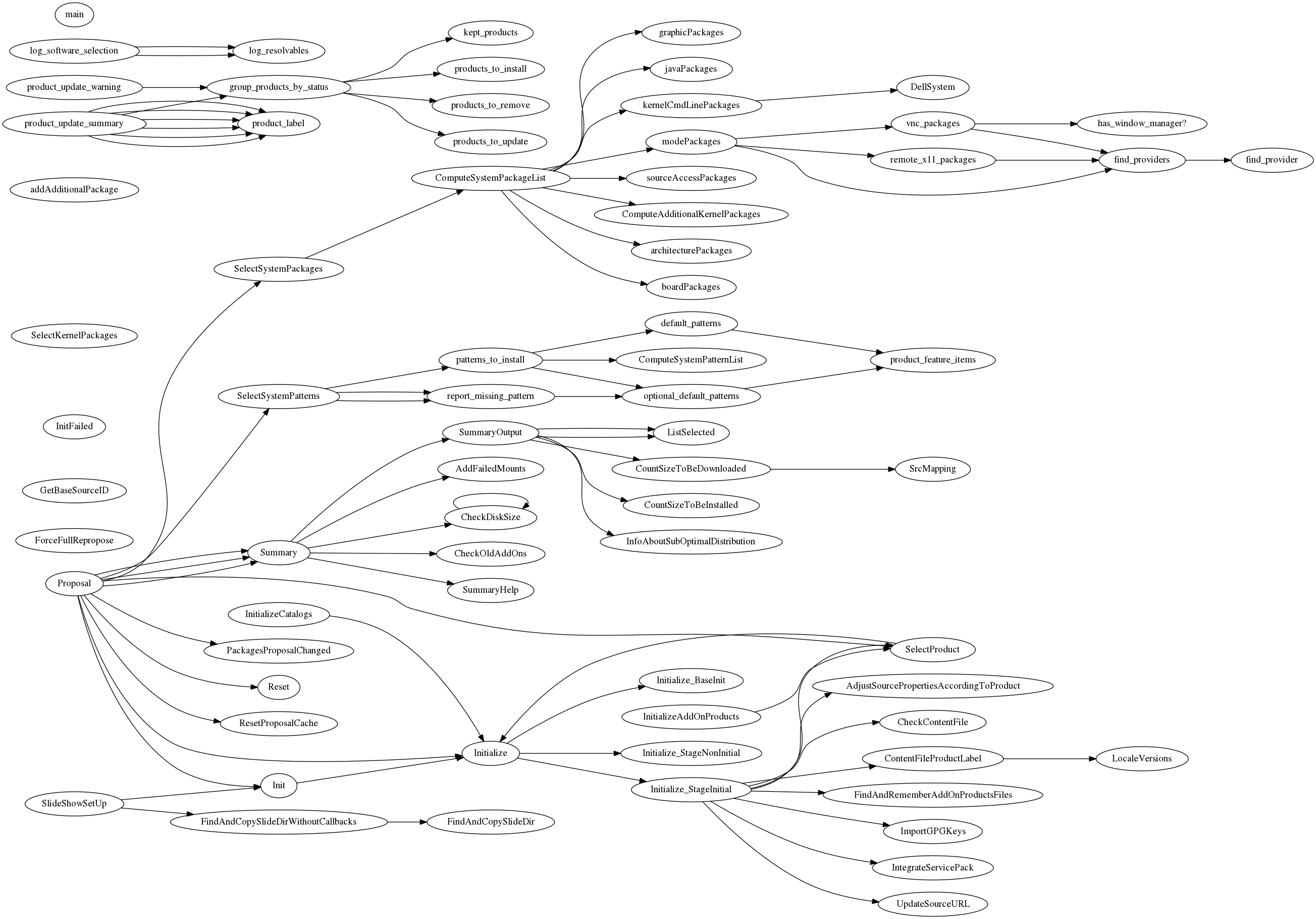
One file in YaST has around 2700 lines and 73 methods. The call graph below was made with
$ ./call-graph ../yast/packager/src/modules/Packages.rb
$ dot -Tpng -oPackages.png ../yast/packager/src/modules/Packages.dot
If the resulting size is too big, use ImageMagick:
$ convert Packages.png -resize 1200 Packages-small.png
Packages.png, an example output

Requirements

License

MIT

Nov 12, 2015

Git: Single Line History

You get a bug report from a user:
/usr/lib/foo/bar.rb:432:in `doit': undefined method `[]' for nil:NilClass (NoMethodError)
but in bar.rb at the line 432 there are no square brackets. The user must be using an older version of the script. Can we find out which one without asking them?

Git can help. This code will go back in history and show the line how it appeared during the past. It's a history of a single line, kind of like "git blame" but in a different dimension.

FILE=lib/foo/bar.rb
LINE=432
git log --format=format:%H $FILE \
| while read COMMIT_ID; do
    echo -n $COMMIT_ID:$FILE:$LINE:
    git show $COMMIT_ID:$FILE | sed -n "$LINE{p;q}"
  done \
| less 

Have I reinvented the wheel? What is its name?

Nov 10, 2015

Arabic Text Bugfix

Can you spot the difference?

Before:
 After:
If this rings a bell but you can't quite remember why, here's an English version of the screen, and the spoiler for the puzzle is below it:
Spoiler: The line containing "passwd" is clipped at the (left) end, showing only "المحا" instead of "المحلي۔". This bug got popular in the YaST team because the localization testers dutifully reported every instance of a truncated label so the bug accumulated 22 duplicates. It only happened for the Arabic script which made it a bit more challenging to work with, but luckily I know the script and a few words.

Thanks to Max Lin who pointed me to a problem between the Qt UI library and the HarfBuzz text shaping engine, the problem is now fixed.

Aug 2, 2013

YaST in Ruby


As already announced on Factory, yast-devel, and by Lukáš: YaST, the SUSE installation and configuration tool, has been automatically translated from YCP, an in-house custom language, to Ruby. In the past 6 months, we have built a tool to translate 600.000 lines of code developed over the course of 12 years.

My role in the project was mainly shedding light on ancient details of the YCP language and its interpreter. Stop pulling my beard, kids! Also, knowing Bison (the tool used to implement the YCP parser in C++) I designed a part that transfers the comments. Mind you, not only at the function or statement level, but from inside of expressions too. Fun!

Thanks to the team, it was great working on the project with you!

May 16, 2011

LinuxTag 2011 Pictures

After a problem with the organizers' equipment, kobliha's openSUSE laptop was used to watch the live stream from Skynet I/O Chrome keynote.
LinuxTag: openSUSE saves the day
"Rule 1: Stay calm." Ralph Angenendt talks about problem solving.
LinuxTag: Breathe!
Party!
LinuxTag: Party in Umspannwerk Kreuzberg

Dec 22, 2010

network-autoconfig: Find a connected eth interface and create an ifcfg for it

Use case: I want to create an appliance image for a build farm worker machine. I don't know its hardware configuration beforehand; in particular, it may have multiple network interfaces and I don't want to bother figuring out which is which. I will simply include network-autoconfig.rpm and plug the cable into any socket before booting.

network-autoconfig helps setting up machines with multiple network interfaces. At the first boot, all available Ethernet interfaces are cycled until one is successfully configured with DHCP.

I have submitted it to openSUSE:Factory now. Enjoy it in the upcoming openSUSE 11.4!

It is referenced as Feature#311012. You are welcome to improve it on Gitorious.

Nov 16, 2010

dbus-dump

dbus-dump is a tool to capture D-Bus messages in a libpcap capture file.

It takes an idea from dbus-scrape, which processes a strace output of dbus-monitor, and takes it further by stracing dbus-daemon, thus not relying on any eavesdropping (mis)configuration.

The intended purpose is to establish the libpcap capture format as a base for debugging tools like

Thanks to Will Thompson for mentioning the pcap idea.

Usage

$ sudo strace -p `pgrep -f 'dbus-daemon --system'` \
    -s 3000 -ttt -xx -o foo.strace
$ ./dbus-dump foo.strace foo.pcap
$ ./dbus-pcap-parse foo.pcap
Tue Nov 16 12:56:47 +0100 2010 #<DBus::Message:0xb741f340
 @body_length=0,
 @destination="fi.epitest.hostap.WPASupplicant",
 @error_name=nil,
 @flags=0,
 @interface="fi.epitest.hostap.WPASupplicant.Interface",
 @member="scan",
 @message_type=1,
 @params=[],
 @path="/fi/epitest/hostap/WPASupplicant/Interfaces/180",
 @protocol=1,
 @reply_serial=nil,
 @sender=":1.7132",
 @serial=88639,
 @signature="">
Tue Nov 16 12:56:47 +0100 2010 #<DBus::Message:0xb741b060
 @body_length=4,
 @destination=":1.7132",
[...]>

Dependencies

It is written in Ruby. The pcap format is handled by a small bundled module. dbus-dump has no other dependencies. dbus-pcap-parse uses ruby-dbus.

Bugs

This is an early proof-of-concept release, serving to introduce the libpcap format.

The main problem of dbus-dump is duplicating the messages, seeing them both when the daemon receives them and when it sends them (multiple times, for the signals).

The other tools haven't caught up yet:

$ /usr/sbin/tcpdump -r foo.pcap
reading from file foo.pcap, link-type 231
tcpdump: unknown data link type 231

Aug 29, 2010

n2n package improved

Root.cz recently ran an article (in Czech) about the n2n virtual private network sofware, an open alternative to Hamachi. I intend to use it to cross the NAT in my mom's DSL modem so that I can connect to her computer with ssh and VNC.
Thanks to happyman_eric and Grief, openSUSE Build Service already contained a package. I have made an improved version, adding an init script and a sysconfig file. Get the sources in my home project, or the binaries.

Aug 10, 2010

Who does not want such a gift

This post is showing naked women packaged as a present (for openSUSE's 5th birthday) and asks Ah... who does not want such a gift, eh.

I believe that the female users and contributors of openSUSE don't. It reduces them to pretty things, judged on their looks instead of their contribution.

Raul, please stop such sexist postings. Your blog is your own, but keep it out from Planet openSUSE.

Just in case common sense is not enough, let me quote for reference the relevant section of the openSUSE Guiding Principles:

We value... respect for other persons and their contributions, for other opinions and beliefs. We listen to arguments and address problems in a constructive and open way. We believe that a diverse community based on mutual respect is the base for a creative and productive environment enabling the project to be truly successful. We don't tolerate social discrimination and aim at creating an environment where people feel accepted and safe from offense.
and the activities in order to excel in our goals: Emphasize the value of communication and recognize cultural diversity within our community.

Aug 5, 2010

Upgraded to openSUSE 11.3

I have upgraded my office workstation to openSUSE 11.3 today. Here I document the migration so that you don't have to repeat my mistakes.

I went via the command line and ventured to keep all additional repos enabled. So switching the repos was done simply by sed -i "s/11\.2/11.3/g" /etc/zypp/repos.d/*

The KDE session crashed after kdelibs4-core had been updated. No big deal, so I ran zypper dup again.
The /home directory is mounted via NFS, so filesystem.rpm failed when it wanted to reset the permissions of /home. Updating it explicitly after unmounting /home was easy, only unmounting it was harder because the crashed session left processes still accessing the home. fuser -v /home found them.

The NFS mount is also authenticated by Kerberos and there is a bug so I got
mount.nfs: access denied by server while mounting nfs.example.com:/home
I had to rebuild and update a package and tweak a config file. See bnc#614293 for the details (thanks to mcaj for the reference).

Jul 22, 2010

ruby-dbus 0.3.1

I have made a bug-fix release of ruby-dbus, a Ruby language binding for the D-Bus IPC system.
  • Many on_signal could cause DBus.Error.LimitsExceeded (bnc#617350).
    Don't add a match rule that already exists, enable removing match rules. Now only one handler for a rule is called (but it is possible for one signal to match more rules). This reverts the half-fix done to fix Issue#3.
  • Re-added InterfaceElement#add_param for compatibility.
  • Handle more ways which tell us that a bus connection has died.
RPMs can be found via Webpin.

Jul 2, 2010

Helping Newcomers

Since the discussion (do check out the linked paper, BTW) and the opensuse-women announcement, I've been thinking about how to make the openSUSE community more friendly to women.

I think one good way is to make sure that new people feel welcome when they join a conversation, be it on the forums, on IRC or on the mailing lists. Now this would be easier if we all had infinite time to read and answer all questions, but as we don't, I decided to focus somehow.

The forums provide a handy shortcut for the focus, labeling a user who made few posts as a "Puzzled Penguin". So I've made a simple service, a feed of http://forums.opensuse.org showing only the posts by newcomer users: http://vidner.net/martin/software/rss-creator-blacklist

(Actually right now it does not show Puzzled Penguins only but instead excludes the 100 most-posting users until I learn how to optimize the PHP code.)

Jun 30, 2010

kiwi2puppet

I have started working on kiwi2puppet, a tool to convert KIWI image descriptions to Puppet manifests.

The goal is to recycle the data that went into the building of an image and use it for managing a deployed appliance.

So far it is a prototype that can write these resources
  • package
  • yumrepo
  • user
  • group
It is written in Ruby, like Puppet.

Source at GitHub: http://github.com/mvidner/kiwi2puppet
RPMs: http://software.opensuse.org/search?q=kiwi2puppet&baseproject=ALL (currently it is a single Ruby script, so at the moment RPMs are not worth any trouble)
Novell Reference: FATE#309497

Get in touch if you're interested.

In case you didn't know:
"The openSUSE KIWI Image System provides a complete operating system image solution for Linux supported hardware platforms as well as for virtualisation systems like Xen Qemu or VMware."
"Puppet is an open source data center automation and configuration management framework. Puppet provides system administrators with a simplified platform that allows for consistent, transparent, and flexible systems management."